Samsung’s One UI 9 Smart Switch now lets iPhone owners start a full wireless move by scanning a QR code with the iPhone Camera app. No Smart Switch install is required on the Apple side, and the transfer includes passwords, passkeys, call history, accessibility settings and eSIM information that previously stayed behind or needed a cable.
The update ships first on the Galaxy Z Fold8, Z Fold8 Ultra and Z Flip8. It pairs with Quick Share that can exchange files with iPhones via AirDrop compatibility, so the social side of the switch stays open after setup.
A QR Code Replaces the Old App Install
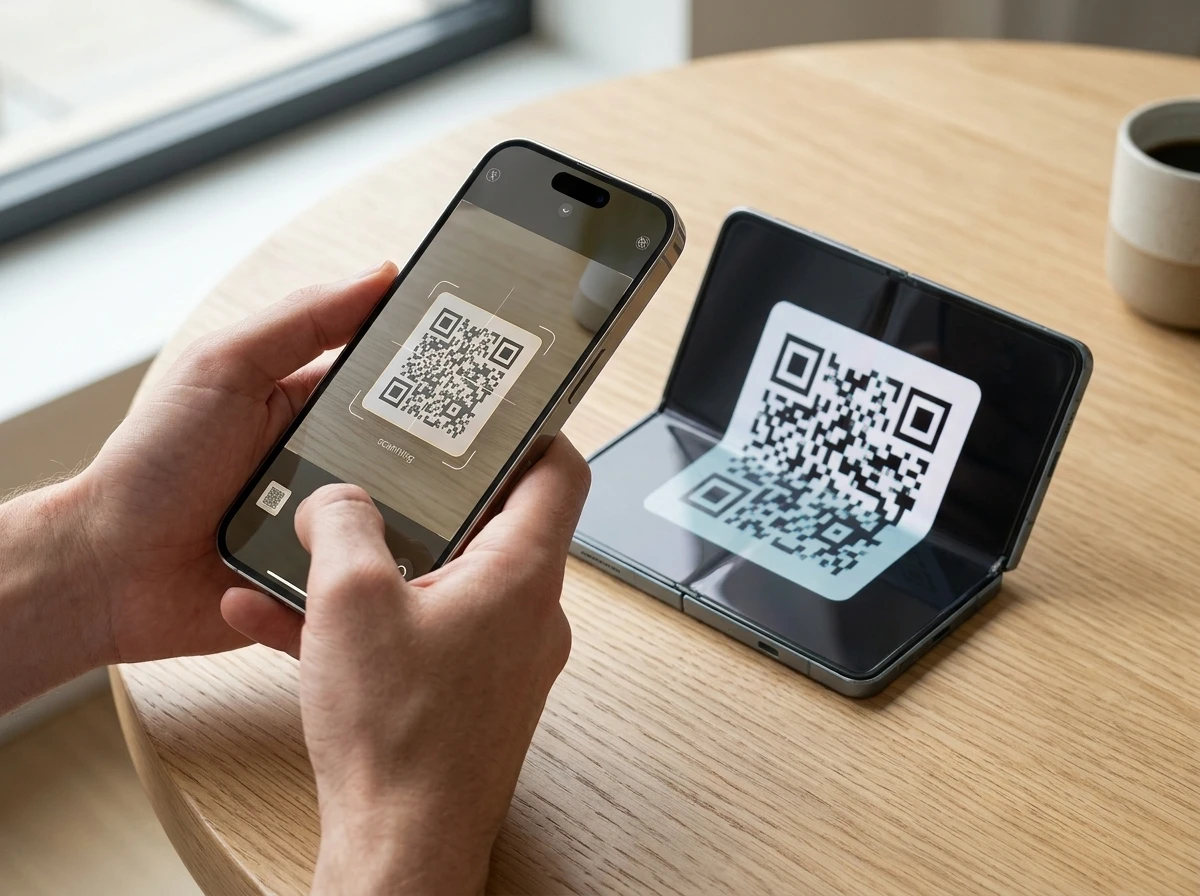
During initial setup on a compatible Galaxy, or later from the Smart Switch app, the phone shows a QR code when the user chooses an iPhone or iPad as the source. The iPhone Camera app reads that code, the user confirms “Transfer to Android,” enters the iPhone passcode, and the two devices pair wirelessly.
That sequence removes the old requirement to sideload a transfer tool onto a locked-down iPhone. The Camera app is already trusted, so the pairing step feels like scanning a Wi-Fi code rather than granting a new app broad device access.
Samsung’s step-by-step wireless transfer guide walks through the wizard: privacy screens, data selection on the iPhone, permission grants, then monitoring progress on the Galaxy. Large iCloud libraries may still need a separate wired or PC path, but the core personal data now travels without cables or adapters.
- Open Smart Switch or follow the setup prompt on the Galaxy and choose Receive, then iPhone/iPad.
- Scan the displayed QR code with the iPhone Camera app and tap Continue / Transfer to Android.
- Authorize with the iPhone passcode and select which categories to copy.
- Keep the phones close until the transfer finishes; check the Smart Switch notification for results.
The same flow works after the phone is already set up, useful if someone kept an iPhone as a second device and later decides to retire it. Progress stays visible on the Galaxy side, so the user can spot a stalled category without guessing whether the link dropped.
Passwords, Passkeys and eSIM Now Move Wirelessly
Earlier wireless Smart Switch runs from iOS were limited mostly to contacts, photos, messages, calendars and basic apps. Passwords and several settings often required a cable or never moved at all. One UI 9 closes that gap for devices on Android 17 / One UI 9.0 and iPhones or iPads on iOS 26.6 or later (outside mainland China).
| Data type | Previous wireless status | One UI 9 wireless |
|---|---|---|
| Passwords and passkeys | Often missing or cable-only | Supported (new) |
| Call history | Limited | Supported (new) |
| Accessibility settings | Usually not transferred | Supported (new) |
| eSIM information | Not available | Supported (new, carrier-dependent) |
| Wi-Fi networks | Partial | Supported (new) |
| Photos, contacts, messages, calendars, apps, home layout | Already supported | Still supported |
The official Samsung newsroom description notes that these less-visible items make the new phone feel ready faster: a saved password means one fewer account to rebuild, accessibility settings preserve a personalized experience, and eSIM data can keep an existing mobile plan active without a full re-activation dance (subject to carrier support).
App data, alarms, notes, voice memos, wallpapers and home-screen layout also travel. WhatsApp chat history is handled separately after the main transfer, either by cable or the app’s own backup tools. LINE full history has region and carrier limits.
Taken together, the newly supported categories cover the quiet work of daily phone use. Credentials unlock services. Call logs keep context. Accessibility options avoid a second setup marathon for users who depend on them.
Quick Share Talks to AirDrop After You Switch
Setup is only half the story. Friends and family often stay on iPhones. Devices on One UI 9 and One UI 8.5 gain enhanced Quick Share that works with Apple’s AirDrop, so files can move both ways without email or messaging apps as the middleman.
Samsung and Google have expanded the Quick Share AirDrop compatibility list across recent Galaxy flagships and Pixels. On the Galaxy side the feature first appeared on S26 models and has reached the new Z series; a toggle under Connected devices lets users turn “Share with Apple devices” on. Both sides typically need to be set to a broader visibility mode for the first exchange.
Good Lock lets new owners reshape the interface: home-screen layouts, swipe gestures, themes and app-switching behavior can be tuned so the phone feels closer to the old iPhone habits. The combination of transferred settings plus Good Lock reduces the “foreign OS” feeling that used to hit on day one.
Once that toggle is on and visibility is open, a photo or document can leave a Galaxy and land on an iPhone the same way it would between two Apple devices. The reverse path works too, which keeps mixed households from inventing workarounds every time someone wants a quick share.
Which Galaxy Phones Get It First
The upgraded Smart Switch experience is live on the Galaxy Z Fold8, Z Fold8 Ultra and Z Flip8, which launched with stable One UI 9. The same One UI 9 beta has already reached multiple rounds on the Galaxy S26 series (fifth and then sixth betas reported by late August 2026), and some A-series models such as the Galaxy A57 and A16 5G are in testing.
Stats snapshot
- Required OS: Galaxy on Android 17 / One UI 9.0 or later; iPhone/iPad on iOS 26.6 or later.
- Current shipping devices: Z Fold8, Z Fold8 Ultra, Z Flip8.
- Next wave: S26 series stable expected after beta; broader flagships and select A-series later in 2026.
- AirDrop Quick Share: One UI 9 and 8.5 on listed flagships, expanding.
- Launch window: Z Fold8, Z Fold8 Ultra and Z Flip8 ship with stable One UI 9 and the full wireless path.
- Late August 2026: S26 series reaches fifth and then sixth One UI 9 betas.
- Later in 2026: Stable One UI 9 expected on S26, then wider flagships and select A-series such as the A57 and A16 5G still in testing.
Readers following the Galaxy Z Fold8 Ultra launch details already know these foldables arrived with the full One UI 9 package. Pixel phones on Android 17 received a parallel upgrade path for easier iOS moves, showing the change is industry-wide rather than Samsung-only.
What Used to Stop an iPhone-to-Galaxy Move
For years the practical blockers were simple and cumulative. Installing a third-party transfer app on a locked-down iPhone felt like an extra security step many users skipped. Wireless transfers left passwords, Wi-Fi lists and accessibility options behind, so the new phone still required hours of re-entry. eSIM reactivation meant carrier calls or store visits. After the move, sharing photos with iPhone friends meant falling back to messaging apps or cloud links because AirDrop stayed inside Apple’s walls.
- Third-party app install on the iPhone blocked or delayed many starts.
- Missing passwords, passkeys and Wi-Fi lists forced manual re-entry.
- Accessibility settings rarely crossed, so personalized input aids vanished.
- eSIM reactivation often needed a carrier call or store visit.
- Post-setup file sharing with iPhone contacts fell back to apps or cloud links.
Those frictions compounded. People who tried a Galaxy for a week often returned because “nothing felt set up.” The old Smart Switch was already better than most Android tools, yet the last mile of credentials and settings still favored staying put. Crowd conversation on X repeatedly called the missing passwords and the app-install step the moments where switches died.
Why the Extra Data Types Matter for Everyday Use
Moving a photo library is visible. Moving the password vault and eSIM is the difference between a phone that works on day one and one that still feels half-empty a week later. Call history keeps recent conversations searchable. Accessibility settings preserve text size, contrast or input aids without rediscovery. Wi-Fi networks reconnect automatically at home and work.
The second-order effect is straightforward: lower exit costs from iOS make a Galaxy trial or permanent switch less risky. At the same time, AirDrop-compatible Quick Share means the user does not have to drag their entire contact list onto Android just to keep receiving files. Samsung is not claiming the ecosystems have merged; it is removing the daily annoyances that previously punished anyone who crossed the line.
That same interoperability thread shows up in the wider Android foldable and ambient display push, where hardware experiments and software bridges move together. For someone already considering a foldable, the data path is no longer the reason to stay away.
Availability will widen as One UI 9 leaves beta on the S26 series and reaches more A-series and older flagships. Until then the Z8 trio carries the cleanest version of the new switch. Carrier support for eSIM transfer still varies by market, so users should confirm with their provider before relying on that piece alone.
A Few Categories Still Need a Separate Path
The wireless wizard covers the bulk of personal data, yet three buckets remain outside the single QR session. Large iCloud photo libraries may still need a wired link or a PC-mediated copy when the cloud set is too big for a clean over-the-air run. WhatsApp chat history restores after the main transfer, either by cable or through the app’s own backup tools. LINE full history stays bound by region and carrier limits.
Knowing those edges up front keeps expectations honest. The passwords, passkeys, call history, accessibility settings, Wi-Fi networks and carrier-dependent eSIM data still arrive in the primary wireless pass. The leftover items are narrower and already had their own recovery routes before One UI 9.
Users who plan the WhatsApp or iCloud step alongside the QR scan finish with fewer surprises on day two. The Galaxy notification summary after Smart Switch finishes is the practical checklist for what landed and what still needs a follow-up.
Mixed Households Keep Sharing Without a Middleman
Many switchers do not leave an all-Apple circle. Partners, parents and coworkers often stay on iPhones, which used to turn every photo handoff into an email attachment or chat upload. Quick Share on One UI 9 and One UI 8.5, paired with AirDrop on the Apple side, cuts that detour when both devices use broader visibility for the exchange.
The Connected devices toggle for “Share with Apple devices” is the Galaxy-side gate. Once enabled on supported flagships, the same back-and-forth that S26 owners saw first extends to the Z Fold8, Z Fold8 Ultra and Z Flip8. Transferred contacts and messages handle the social graph; Quick Share handles the files that graph still wants to pass around.
That split matters for anyone testing a foldable while the rest of the family remains on iOS. The phone can receive the old vault and settings, then keep trading media with Apple devices without forcing everyone else to change platforms on the same weekend.
Frequently Asked Questions
What new data types does One UI 9 Smart Switch copy from an iPhone?
Beyond the long-standing photos, contacts, messages, calendars and apps, the update adds passwords and passkeys, call history, accessibility settings, Wi-Fi networks and eSIM information on supported wireless transfers. App data, home layout, alarms and notes also move; WhatsApp history is restored separately afterward.
Do I still need to install Smart Switch on my iPhone?
No. On iOS 26.6 or later paired with a Galaxy running One UI 9 / Android 17, the iPhone Camera app scans the QR code shown on the Galaxy and the transfer begins after passcode confirmation. The Smart Switch app is no longer required on the Apple device for this path.
Which phones support the upgraded wireless transfer right now?
The feature is available on the Galaxy Z Fold8, Z Fold8 Ultra and Z Flip8 that shipped with One UI 9. Galaxy S26 series devices are in late beta; wider rollout to additional flagships and select A-series models is expected later in 2026 once stable One UI 9 expands.
Can Quick Share still send files to iPhones after the switch?
Yes. Compatible Galaxy devices on One UI 9 and One UI 8.5 can use Quick Share with AirDrop so files travel to and from iPhones and other Apple devices. A settings toggle enables sharing with Apple devices; both sides usually need open visibility for the exchange.
Does eSIM transfer work with every carrier?
eSIM information can move, but success depends on the carrier and region. Samsung notes that availability varies; users should check their operator’s eSIM support list before assuming the line will activate automatically on the new Galaxy.