
As of July 7, 2026, Google counts every data type stored in an Android backup toward the user’s Google Account storage. The change reaches SMS messages, call history, and device settings, three categories that previously did not count against the storage quota, and Google says backups will grow by 40 MB on average.
New on-off toggles arrive in Google Backup settings at the same time, giving Android users the option to leave specific categories out of their next backup. New Android backup users see the updated rules from July 7 onwards; existing accounts will receive them over the coming months. A Google spokesperson confirmed the policy update to multiple outlets.
All Android Backup Data Now Counts Against Google Storage
Google updated its Android backup policy this week, replacing a setup where only Google Photos uploads and the media inside MMS messages counted toward storage. The change reaches SMS messages, call history, and device settings, three data categories that previously did not count, per what’s changing in Android backup storage on July 7. The new rule folds every data type in the Android backup menu into the same pool that covers Gmail, Google Drive, and Google Photos. That pool is the standard free Google Account allowance, capped at 15 GB for accounts that have not upgraded to a paid plan.
Google framed the shift in numbers, calling the impact modest. The spokesperson repeated the same figure to multiple outlets, all focused on the size of the typical impact and the breadth of the rollout. Most users, the spokesperson said, will barely notice the extra weight against existing storage use.
Other numbers frame how the policy lands against existing quotas. Every Google Account comes with up to 15 GB at no charge, shared across Drive, Gmail, and Photos, per Google’s own help documentation. Paid Google One plans raise that ceiling, starting at 100 GB for monthly subscribers. The July 7 update lands inside a year that has already changed free storage: in May 2026, Google began testing a reduced default allowance of 5 GB for new accounts that did not verify a phone number, with the full allowance restored after verification, per how the new backup storage policy rolls out. Most users will see almost no change, since the average incremental cost is a tiny fraction of even the smaller free allowance.
| Data type | Before July 7, 2026 | After July 7, 2026 |
|---|---|---|
| Google Photos images and videos | Counts | Counts |
| MMS photos and videos | Counts | Counts |
| SMS text messages | Does not count | Counts |
| Call history | Does not count | Counts |
| Device settings | Does not count | Counts |
- 40 MB: average extra storage an Android backup uses after the July 7 policy change.
- Effective on July 7, 2026 for new Android backup users.
- 15 GB: standard free storage allotment shared across Google Account services.
- 5 GB: default new-account storage Google has been testing since May 2026.
- 100 GB: starting storage tier for Google One subscribers.
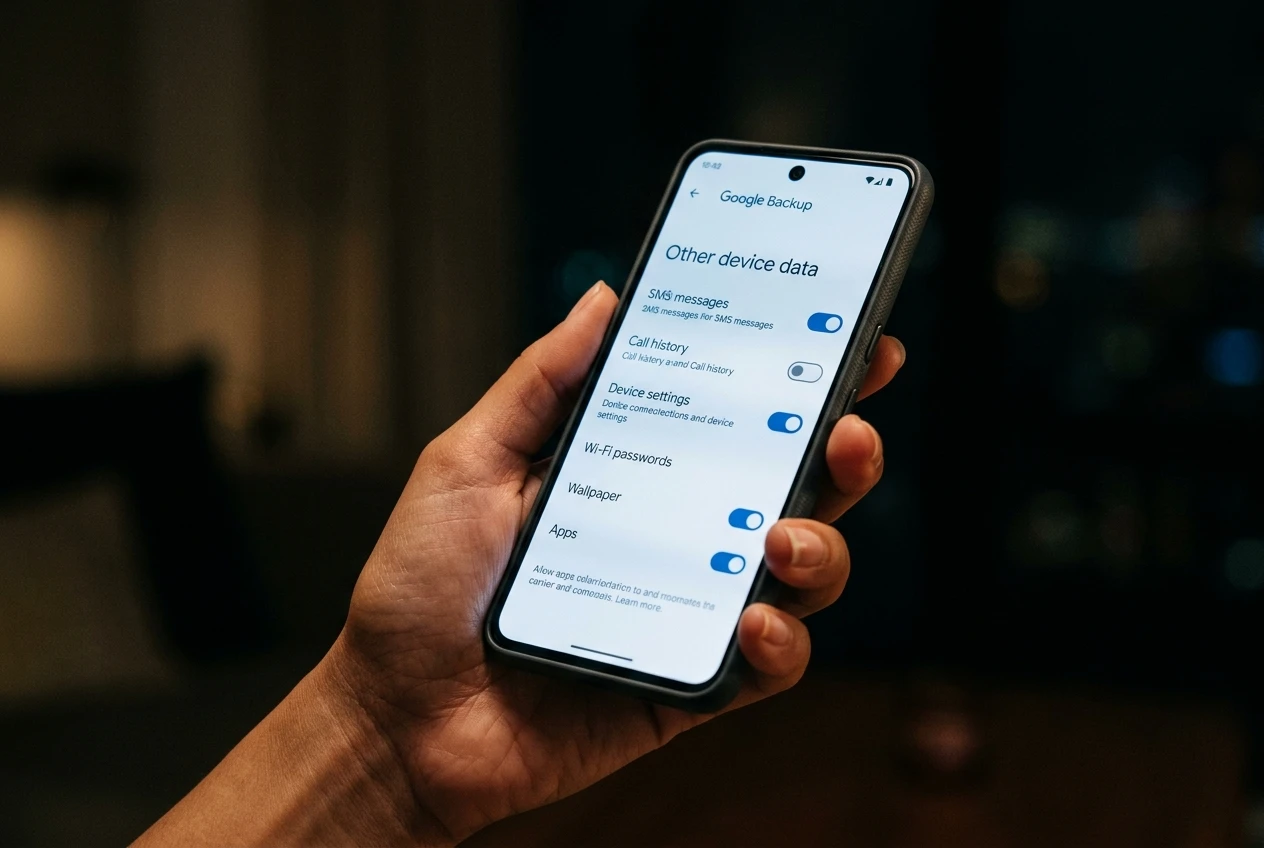
Three Toggles Give Users More Control
The change arrives paired with new controls. Google is adding on and off toggles for three categories inside the Android backup settings menu, letting users keep specific data out of their next backup.
The categories match the three now being counted. SMS and MMS messages get one switch, separate from the toggle that controls whether call history is saved. Device settings get a third, covering the Android-level preferences users typically want to restore on a new phone. Per-app backup controls that Google rolled out earlier remain available for choosing which individual apps save their data.
Where to Find the New Controls on Your Phone
On a Pixel phone, the path to the new backup settings runs through the Android settings app: open Settings, tap Accounts and backup, choose Google Backup, then select Other device data to reach the toggles, as described in Android backup and restore instructions. The settings page also accepts a keyword search, with backup as the surface term that brings Google’s controls into view. Menu labels vary across manufacturers, since each Android phone maker arranges its backup options in its own structure.
The toggle screen lists each backed-up data type with its current state. New users enabling Android backup for the first time after July 7 will see the toggles available immediately. Existing users will receive the same options gradually as part of the broader rollout over the coming months. The settings menu also lets users check what data and which apps are already part of their current backup. Google’s own help documentation notes that backups upload to its servers and help transfer data between devices, with sensitive material encrypted by the device’s screen lock where the user has set one up.
Turning a toggle off excludes that data from the next backup without affecting data that has already been saved to the user’s account. Users who want to delete a prior backup will need to do that separately, since Google’s help page keeps older snapshots until the user removes them.
The Bigger Storage Picture at Google
The Android backup update is one data point on a longer curve at Google. Across recent months, the company has been reshaping how free storage works, both in policy and in default settings, while keeping the most common experience free. WhatsApp backups on Android already counted against Google Account storage before this change, per Google’s own help documentation. Stepped together, the changes point to a Google storage tier that is being made smaller for some users and more deliberate for everyone.
Android backup lets you save the data on your phone to your Google Account so you can easily restore it or set up a new device. We’ve updated our policy so that all Android backup data now counts toward Google Account storage. We expect this to only add 40MB on average. We’re also giving you more transparency and new controls that let you select which data and apps you want to back up.
A Google spokesperson delivered that statement to multiple outlets, including 9to5Google, in announcing the policy change this week. The same figure appeared in subsequent coverage. The message carries the same content in every outlet: a small storage impact paired with new on-off toggles users can opt into.
Who Will Actually Notice the Difference
Most users, by Google’s own estimate, will see almost nothing change. The average backup’s footprint grows by 40 MB on average, smaller than a handful of high-resolution photos and trivial against the standard free allowance. Users whose backups sit comfortably under that ceiling, with plenty of room left for Gmail and Drive, are unlikely to feel the change at all. The first users affected are new Android backup accounts created from July 7 onwards. Existing users will see the new policy and toggles arrive gradually over the coming months.
The users likely to notice first are those already near the storage limit. A person running Google Photos on original quality, with several years of personal photos already loaded into the free pool, has less headroom than the typical user. There, the new toggles act as a real lever: skipping device settings, or skipping SMS, can keep the small increment from breaking the budget.
For users willing to clear existing data, Google’s help pages outline the paths: deleting existing WhatsApp backups, emptying Gmail’s Spam and Trash folders, and clearing files in Google Drive Trash each free up space. Free-tier users who regularly hit the ceiling can also pay for Google One, where the extra increment becomes a non-issue at the smallest paid tier and above. The same toggles help paying users keep their cloud footprint tidy by excluding data they never restore from the next backup. Google’s help page on storage notes that older backups remain on the server until the user removes them, regardless of how the new toggles are set.
Frequently Asked Questions
When does the Android backup storage change take effect?
The change takes effect for any new Android backup users setting up a Google Account backup after July 7, 2026. Existing Google Accounts will receive the updated policy and the new toggles over the following months, with the specific timing depending on Google’s rollout schedule.
How much extra storage will my backup use?
Google’s stated average is 40 MB of additional storage per backup, applied once the new data categories begin counting toward Google Account storage. The figure is an average, so individual backups may use slightly more or slightly less depending on the size of the user’s SMS archive and call history.
Can I turn off the new backup categories?
Google is rolling out on and off toggles for SMS and MMS messages, call history, and device settings inside the Android backup settings menu, with users able to disable any of the three. On a Pixel phone, the path runs through Settings, then Accounts and backup, then Google Backup, then Other device data. The same path works on most Android phones, though menu labels may vary by manufacturer.
Does this change mean I have to pay for Google One?
No. Google framed the change as small for most users, and the standard 15 GB free allotment remains in place for accounts that have not upgraded. Paid Google One plans start at 100 GB for monthly subscribers, but the new policy does not require anyone to buy more storage.
What happens if I’m already close to my Google Account storage limit?
Google lets users delete existing WhatsApp backups, clear Gmail Spam and Trash, and remove items in Google Drive Trash to reclaim space, as detailed in what counts toward Google Account storage. If the limit is already crossed, Gmail stops sending and receiving, Google Drive stops syncing new files, and Google Photos stops backing up new photos until space is freed.