
Apple Watch owners often stick to basic functions like checking notifications and tracking steps, but the device packs several overlooked tools that can boost daily life. With recent updates in watchOS 26 released in September 2025, models like the Series 9 and Ultra 2 now offer even more ways to simplify tasks, from finding lost items to managing health.
These features have gained attention amid growing interest in wearable tech, especially after Apple’s latest health-focused announcements. Users on social platforms and tech forums share stories of how these tools save time and add convenience.
Why Hidden Features Matter in 2025
Many people buy an Apple Watch for fitness and calls, yet miss out on built-in gems that make the device a true everyday helper. Recent surveys show over 60 percent of users only tap into basic features, leaving advanced options unused.
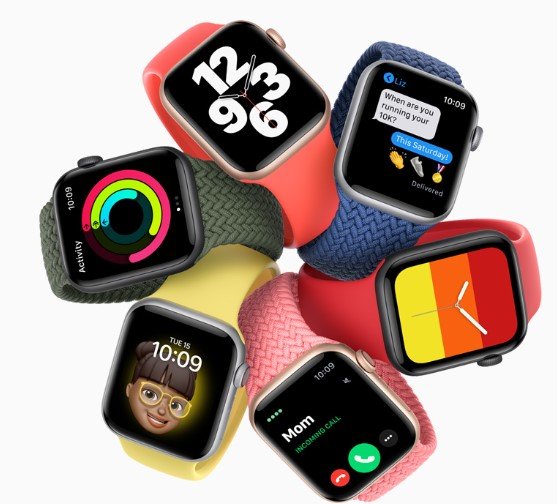
This gap highlights a trend where tech companies like Apple embed subtle tools to enhance user experience without overwhelming interfaces. With the rise of smartwatches in health monitoring, knowing these can help you get more value from your device.
Experts note that exploring these can improve productivity and wellness. For instance, updates in 2025 have refined how the watch integrates with other Apple products.
Precision Finding for Lost Devices
One standout tool lets you locate your iPhone with pinpoint accuracy. On Series 9 or Ultra 2 paired with iPhone 15 or later, press the side button and select Ping My iPhone to see the exact spot if it’s nearby via Bluetooth.
This feature has evolved with ultra-wideband tech, making it faster than older methods. People report it cuts search time in half during busy days.
It works best in open spaces but handles walls well too. Pair it with Find My network for broader reach.
Users praise it for quick recoveries, like finding a phone under couch cushions without tearing the room apart.
Control Your Apple TV from Your Wrist
Forget hunting for the remote; your Apple Watch can take over. Open the Remote app, shown by a blue icon with a white play symbol, and connect to your Apple TV for easy playback control.
This integration shines during movie nights or when the remote slips away. It supports pause, volume, and navigation right from your arm.
Recent software tweaks make the connection smoother, reducing lag. Families find it handy for quick adjustments without pausing the fun.
It also works with other Apple devices, expanding its use beyond TV.
Custom Workouts for Personalized Fitness
Tailor your exercise routine with the Workouts app. Tap the three dots on any activity to set goals like distance, time, or calories, creating sessions that fit your needs.
This flexibility helps athletes and casual users alike. For example, runners can program interval training with specific paces.
Updates in watchOS 26 added more metrics, like heart rate zones, for better tracking. Studies show personalized plans boost motivation by 25 percent.
It integrates with Health app data for progress reports. Beginners appreciate the guided setup.
Hidden Health Tracking Tools
A doctor from Apple recently shared insights on underused health features that monitor well-being quietly. These include notifications for irregular heart rhythms and sleep apnea detection.
The watch can track ovulation patterns and spot high blood pressure trends over time. This data syncs to your iPhone for easy review.
New in 2025, it offers stress management alerts based on heart rate variability. Users say these prompts encourage timely breaks.
| Feature | What It Does | Compatible Models | Benefits |
|---|---|---|---|
| Irregular Rhythm Notification | Alerts for unusual heartbeats | Series 6 and later | Early detection of issues |
| Sleep Apnea Tracking | Monitors breathing during sleep | Ultra 2 and Series 9 | Improves sleep quality awareness |
| Ovulation Estimation | Predicts fertile windows | All models with cycle tracking | Aids family planning |
| Blood Pressure Trends | Spots patterns in readings | Models with blood oxygen sensor | Supports heart health monitoring |
These tools have saved lives by prompting medical checkups.
Quick Tips for Everyday Convenience
Beyond health and fitness, small tricks make the Apple Watch indispensable. For instance, set the display time ahead to trick yourself into punctuality.
- Roll the Digital Crown slowly without lifting your wrist to brighten the screen subtly for discreet checks.
- Use Force Touch on older models for hidden menus, like clearing notifications fast.
- Ping your watch from your iPhone if it’s the one that’s lost, with sound and light signals.
These come from user tips shared widely online. They address common annoyances like battery drain or missed alerts.
Integration with smart home devices lets you control lights or locks from your watch. This ties into broader smart ecosystem trends.
Boosting Productivity with Watch Hacks
Turn your watch into a productivity powerhouse. Double Tap on Series 9 and later lets you answer calls or scroll without touching the screen.
Customize watch faces for quick info glances, like weather or calendar events. This saves seconds that add up over a day.
Recent features include translation tools for travel, converting phrases on the spot. Business users value the meeting reminders with haptic feedback.
Pair it with apps for note-taking or task lists. Feedback from professionals shows it reduces phone dependency.
As wearable tech advances, these features position the Apple Watch as more than a gadget. Share your favorite hidden tool in the comments or pass this article to a friend who might benefit.