
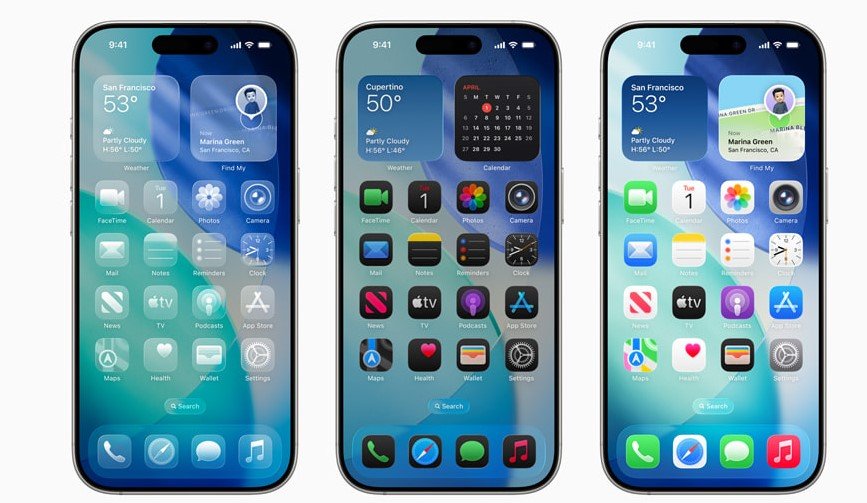
Apple has launched the iOS 26.1 update for iPhones worldwide, bringing fresh tools like adjustable Liquid Glass effects and expanded Apple Intelligence features. This major release, available starting November 3, 2025, aims to boost user control, improve daily tasks, and fix bugs for a smoother experience on supported devices.
What’s New in iOS 26.1
This update builds on iOS 26 with practical changes that make iPhones easier to use. Apple focused on customization and smart features to meet user needs.
One big addition is the Liquid Glass setting. Users can now tweak transparency levels in system elements for better readability. This helps in apps and on the lock screen where text might blend into backgrounds.
Apple Intelligence gets a boost too. Live Translation now works with more languages like Chinese, Italian, Japanese, and Korean. This makes real-time communication simpler for global users.
Other tweaks include gesture controls for music and alarms. For example, swipe to skip tracks in Apple Music or slide to stop timers quickly.
The update also improves audio recording with USB mics by adding gain controls and storage options. FaceTime calls sound clearer even on weak connections.
Top Features at a Glance
iOS 26.1 packs several updates that enhance everyday use. Here are the standout ones:
- Liquid Glass toggle: Adjust opacity for clearer interfaces.
- Expanded Live Translation: Supports new languages for AirPods.
- Gesture improvements: Swipe for music skips and slide to stop alarms.
- Camera lock screen option: Disable accidental camera opens.
- Fitness app upgrade: Log workouts manually with ease.
These changes show Apple’s push for more personalization. Early users report faster performance and fewer glitches.
How to Update Your iPhone
Getting iOS 26.1 is straightforward and takes just a few steps. Make sure your device is ready to avoid issues.
First, back up your iPhone using iCloud or a computer. This protects your data in case something goes wrong during the update.
Go to Settings, then General, and tap Software Update. If iOS 26.1 shows up, hit Download and Install. You need a strong Wi-Fi connection and at least 50 percent battery.
The process usually takes 10 to 30 minutes. Your iPhone will restart once done. Check for the new features right after.
If the update does not appear, wait a bit as the rollout is global and might take time to reach all regions like India.
Apple recommends updating soon for security fixes and better stability. This release patches minor bugs from iOS 26.
Eligible iPhone Models
Not every iPhone can get iOS 26.1. Apple supports models from recent years to ensure smooth performance.
The list starts with the newest devices and goes back a few generations. Older models might miss out on some advanced features like full Apple Intelligence.
Here’s a quick table of supported iPhones:
| Series | Models |
|---|---|
| iPhone 17 | iPhone 17, iPhone 17 Pro, iPhone 17 Pro Max, iPhone Air |
| iPhone 16 | iPhone 16, iPhone 16 Plus, iPhone 16 Pro, iPhone 16 Pro Max, iPhone 16e |
| iPhone 15 | iPhone 15, iPhone 15 Plus, iPhone 15 Pro, iPhone 15 Pro Max |
| iPhone 14 | iPhone 14, iPhone 14 Plus, iPhone 14 Pro, iPhone 14 Pro Max |
| iPhone 13 | iPhone 13, iPhone 13 mini, iPhone 13 Pro, iPhone 13 Pro Max |
If your iPhone is on this list, you should see the update soon. Apple dropped support for models older than iPhone 13 to focus on modern hardware.
Why This Update Matters
iOS 26.1 comes at a time when users want more control over their devices. With rising interest in AI tools, the expanded translations fit current trends in global connectivity.
Experts note this update sets the stage for iOS 26.2, expected in beta soon. It could bring even more AI enhancements, building on reports of revamped Siri integrations.
Compared to past releases, this one feels user-focused. It solves common complaints like accidental camera opens and unclear interfaces.
For iPhone owners, updating means staying secure and getting the latest perks. It ties into broader tech shifts, like Apple’s push into smarter ecosystems.
Looking Ahead
Apple’s quick rollout shows commitment to regular improvements. This update refines iOS 26 without major overhauls, making it a safe upgrade for most.
As tech evolves, features like these keep iPhones competitive. Users in creative fields or travel might find the new tools especially handy.
Share your thoughts on iOS 26.1 in the comments below. Did the Liquid Glass toggle improve your experience? Let us know and pass this article to fellow iPhone users.